Smart home
Smart home and connected hardware
Edge devices with touch screens, lighting and AC control, and Shabbat clocks — managed from a central server with dashboard, messages, and reports.
What we build in practice
The servxx smart-home system connects apartment hardware to a central management UI. Each unit has an ESP32 touch device; the server manages all apartments, sends commands, publishes announcements, and tracks connectivity and usage.
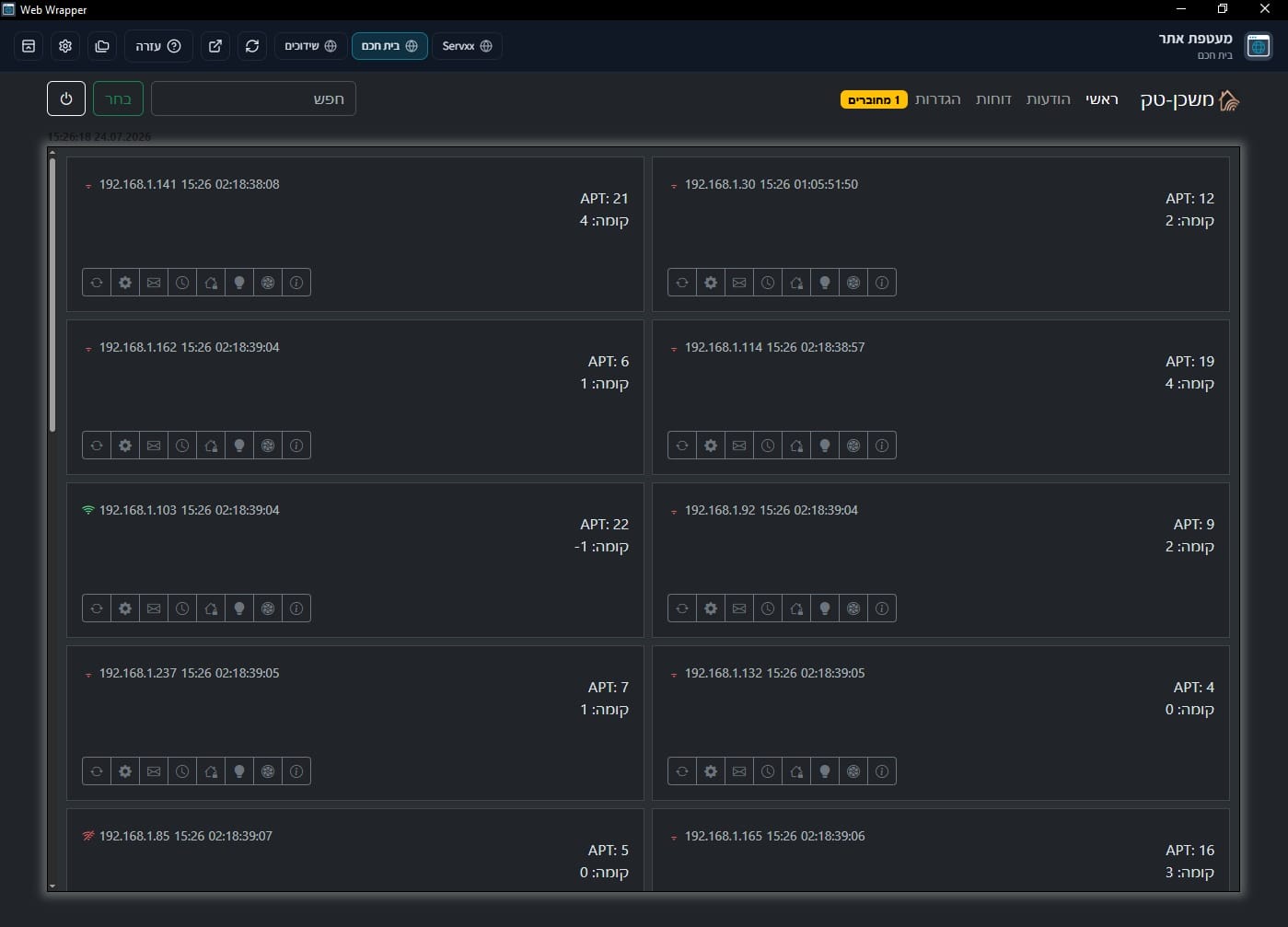
The Hebrew (RTL) UI is built for a building or complex: an apartment card grid, live connection status, lighting and AC control, per-unit Shabbat clocks, and cost/savings reports.
The same project includes a device screen builder — so you can adapt the on-device UI without replacing hardware.
How it connects
A simple, stable architecture: the device reports to the server, and the server returns queued commands.
The device sends a periodic ping to the server API with connectivity, location, and relay state. Commands wait in a queue until the device pulls them. WebSocket can also refresh the live dashboard.
No mandatory external cloud: you can host the server yourself. The device also supports local SoftAP setup for first-time Wi‑Fi connection.
API and command queue
Central management server
Dashboard and admin
Management dashboard
A central UI for every unit in the building — in Hebrew, with live status and a view of each apartment.
The dashboard shows a card grid: apartment, floor, IP, connection state, and quick actions. You can filter, search, and edit multiple units together.
Apartments and units
A card per apartment: floor, number, online/offline status, and access to settings, Shabbat clock, lighting, and AC.
Remote control
Turn lights and AC on or off from the UI, including multi-unit actions with staggered timing when needed.
Messages and announcements
Send messages to one unit or many, and show announcements on the apartment touch screen.
Live connectivity
Track who is connected, signal strength, and last update time — so you know what is happening on site.
Cost and savings reports
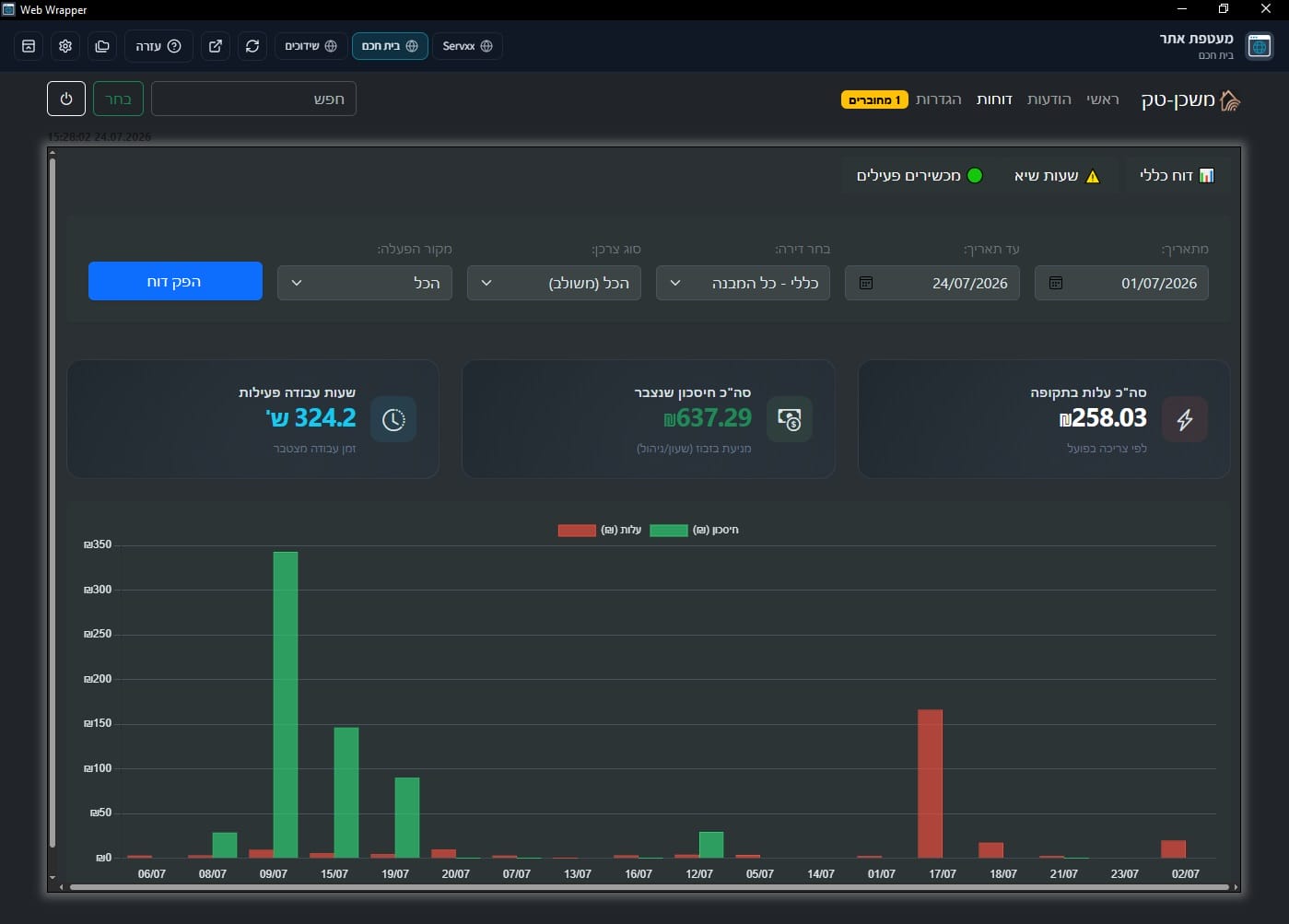
Clear usage insight: what it cost, what was saved, and how many active hours in the period.
Generate a report by date range, apartment, consumer type, and operation source. See actual cost, savings from waste prevention (timer/cancel), and active hours — including a daily chart.
Precise filters
Pick a period, apartment or whole building, consumer type, and operation source — then generate the report.
Cost vs savings
A money summary from real consumption, plus savings accumulated from automatic waste prevention.
Daily chart
A visual view of cost and savings across days — to spot peaks and peak hours.
Shabbat clocks
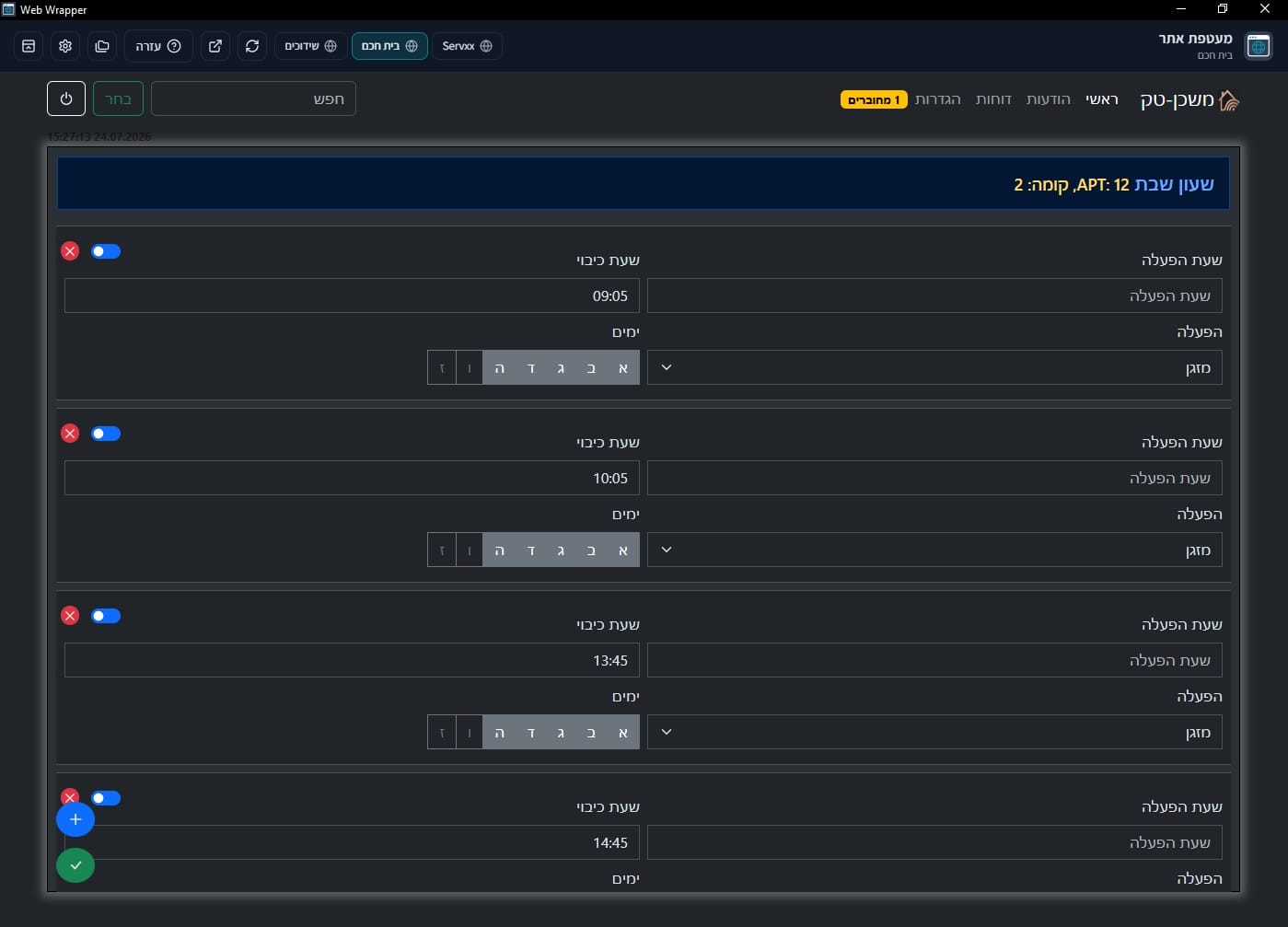
Schedule on/off by days and times — per apartment and per consumer.
For each unit you define time windows: start time, stop time, weekdays, and the target device (for example AC). Enable or disable a clock, and add multiple entries.
By apartment and floor
Configure a specific unit, with save to the server and the edge device.
Days and consumers
Choose weekdays and the target — lighting, AC, or additional relays.
Waste prevention
Automatic shutoff by schedule contributes to the savings shown in reports.
The edge device
An ESP32 touch unit in the apartment — local control and server connection.
Hardware is based on ESP32-S3 with a 320×480 IPS touch screen. The device drives light and AC relays, IR for common AC brands, a local Shabbat schedule, and on-screen announcements.
Touch UI
LVGL interface in Hebrew and English: main screen, settings, messages, and connection status — including screen layouts from the builder.
Lighting and AC
Local and remote relay control, plus IR AC remote support for common brands.
Works without cloud
SoftAP Wi‑Fi setup, settings and clock stored on device, and local control even if the server is temporarily offline.
Server sync
State reporting, command pull, Shabbat clock updates, announcements, and UI layout from the builder.
Core capabilities
A short summary of what the system includes end to end.
ESP32 unit management
Device registration, command queues, and connection status per apartment.
Lights, AC, and screens
Remote and local control — including the apartment touch screen.
On-screen announcements
Publish content and messages shown directly on the touch screen.
UI builder
Build device screens from the system — buttons, clock, weather, and more.
A look at the system
Screenshots from the management dashboard — apartments, reports, and Shabbat clocks.
Who it is for
Fits buildings, complexes, and projects that need central control of many units.
Building / complex management
When you have many apartments and need one dashboard with status and control.
Shabbat and scheduling
When you need reliable Shabbat clocks per unit, with savings reports.
Hardware and software together
When you want a real edge device plus a management server in one project.
How we proceed
From discovery to on-site install.
-
Discover
Define unit count, what to control (lights/AC), and what appears on the screen.
-
Install
Deploy the server, connect devices to the network, and configure apartments and clocks.
-
Run and support
Field checks, reports, and UI/device updates as needed.
Have a smart-home project?
Tell us how many units you need and what matters to control — we will come back with a clear starting direction.
Discuss a smart home project