Downloads Hosts Manager
Hosts Manager — edit hosts without Notepad
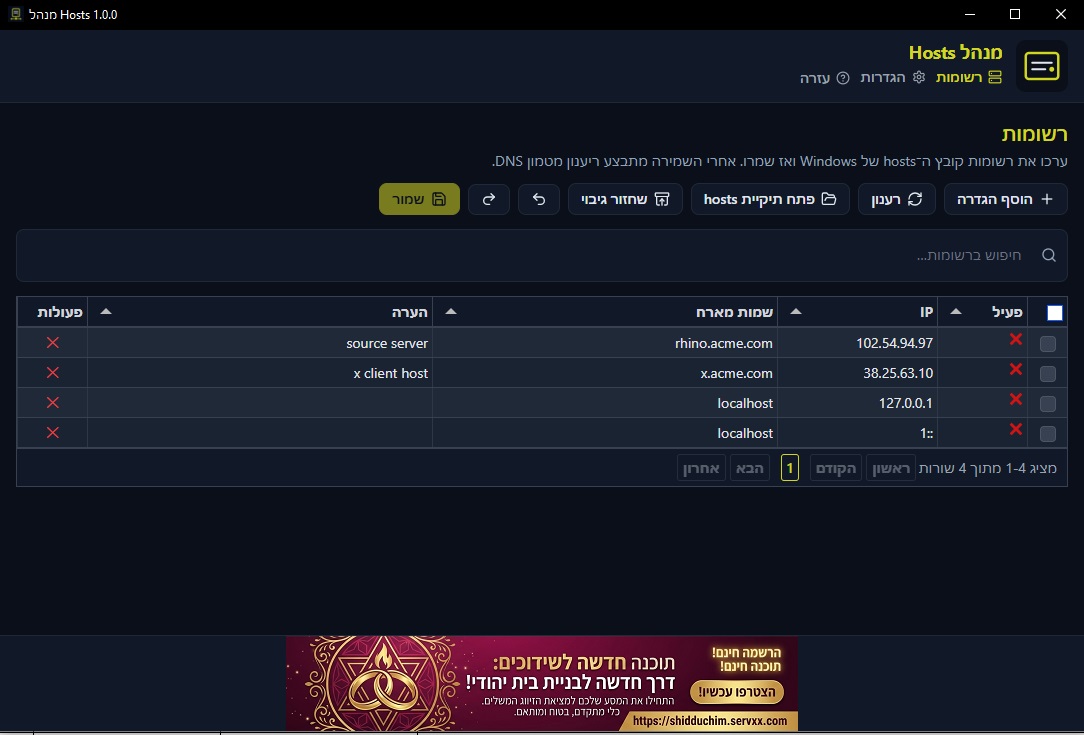
Dynamic management of the Windows hosts file: a table to edit, add and delete, enable or disable, save with flushdns, and backup before every save.
- Windows 10/11 (64-bit)
- Hebrew · English
- Available to download from servxx
What is this app?
Hosts Manager is a desktop app for comfortably editing C:\Windows\System32\drivers\etc\hosts. Instead of opening Notepad as administrator, edit rows in a table and click Save — the app writes the file and flushes the DNS cache.
Before every save an automatic backup is kept; you can restore, search, and multi-select rows. Hebrew (RTL) UI by default, with English and dark/light themes.
The app runs elevated (UAC on launch) so it can write the system hosts file without prompting again on every save.
Who it is for
For developers, network admins, and anyone who needs local host mappings without hand-editing a text file.
-
Local development
Map myapp.local to 127.0.0.1 and other dev environments — quickly, without Notepad.
-
Testing and networking
Point domains at internal servers, staging, or temporary addresses for checks.
-
Workstation maintenance
Manage hosts entries on work PCs with orderly backup and restore.
-
Power users
Enable and disable rows, search, and bulk actions — without risking the file with a manual edit mistake.
Key features
-
Editable table
Add, delete, enable or disable IP and hostname mappings directly in the table.
-
Save and DNS
Write the system hosts file, then run ipconfig /flushdns so changes take effect quickly.
-
Backup and restore
Automatic backup before every save, with restore from the latest backup.
-
Search and multi-select
Filter by IP, name, or comment — and enable, disable, or delete several rows at once.
-
Hosts folder
Open the etc folder in Explorer with the hosts file selected.
-
Hebrew and English
RTL Hebrew UI by default, switch to English, and dark or light theme.
-
System tray
Minimize to tray and optional start with Windows.
-
Proper installer
Installer with automatic WebView2 if missing, shortcuts, and a clean uninstall.
Quick start
- 1. Download the installer from GitHub Releases or via direct download from servxx.
- 2. Open the app and approve elevation (UAC) if prompted.
- 3. Add or edit a row in the table and click Save.
- 4. Confirm the change took effect (after the automatic flushdns).
- 5. To roll back: use restore from backup if needed.
Tips and limits
- Administrator rights are required to write the system hosts file.
- Rows with an invalid IP or missing hostname are marked — you cannot save until fixed.
- Changes stay in draft until Save; closing with unsaved edits shows a warning.
- Please respect Shabbat and Jewish holidays.
Requirements and data
- Windows 10 or 11, 64-bit · run as administrator · WebView2 (installed automatically if missing)
- UI settings stored locally · hosts backups created before save
UI data under %AppData%\hosts-manager. The hosts file itself stays on the system path.
Ready to manage hosts?
Download the installer from GitHub or via direct download, install, and edit the table instead of Notepad.